
What's new
The headline changes, newest first. The full list lives in CHANGELOG.md.
v0.2.32 - no more empty-handed answers
When the assistant said "let me check" and then went quiet, or searched and searched and ended with "Sorry, I could not answer that one", it was the loop giving up, not the knowledge. Both now get a second chance: an announced lookup is nudged to actually happen, and a search that runs out of rounds is turned into an answer from what it found. The persona also has more room, six thousand characters, for the rules that keep a conversation on track.
v0.2.31 - no more "next event" that already happened
If the assistant was asked what is coming up and named an event from last month, that is fixed: the events lookup now tells the assistant plainly which events are upcoming, which are still running, and which are over, and says "nothing is scheduled right now" when that is the truth. Also fixed: the michi shield in the admin was missing on production.
v0.2.30 - you can watch an import happen
Importing a tenant used to mean staring at a spinning button and, for a big knowledge base, an error page when the connection gave up. Now the import starts and the page answers right away; the tenant page and the knowledge page show a banner that counts up, "7 of 9 documents, 3,120 of 7,003 chunks, embedding HS 2022 product codes", and ends with "Imported 9 documents in 70s" or the reason it failed. Documents that did not change are skipped. If someone starts a second import of the same tenant while one is running, they get a polite no with the current progress.
v0.2.29 - big imports and wide logos
Two things stopped saying "This page couldn't load": importing a large tenant file and saving a very large knowledge document. Both used to hit a hidden 1 MB limit; it is now 8 MB. And a tenant whose logo is a wide wordmark, not a square mark, now sees it whole in the chat header instead of cropped. In the tenant list, coach tenants carry a small badge.
v0.2.28 - staff see only their tenants
On Accounts you now tick which tenants a staff account may see, and that is all they see anywhere in the admin: tenant list, conversations, Unanswered, Usage, analytics, knowledge base. A staff account with nothing ticked sees nothing until you assign it, so a new login is safe by default. Owners keep seeing everything. If you already have staff accounts, tick their tenants after this update, or they will find an empty admin. Unanswered also got the tenant chips from Conversations.
v0.2.27 - the page head stays with you everywhere
The sticky head from the tenant form now applies to every admin page that has something to press up there: a transcript's Flag, Export, Delete and Back, the knowledge base and analytics links, the tenant filters on Conversations. Scroll as far as you like; the way back is always at the top.
v0.2.26 - links you can tap, and a glossary for the bars
When the assistant gives an email, a phone number or a web address, it is now a real link: tap to mail, tap to call, tap to open the page in a new tab. On the Analytics page the "What visitors reach for" bars used to show bare function names; each one now comes with a plain-words card saying what it does, what goes in and what comes back. The tenant form keeps its name, links and Save button in view while you scroll. And when the cafe website cannot report the weather, the assistant suggests a drink from the specials or the menu instead of apologising.
v0.2.25 - a second kind of tenant: the coach
Until now every tenant was a customer assistant for one business. There is now a second kind, coach: an application sends it facts with every message and it explains them to one learner, without the "I only answer questions about the business" reflex. The first one is Chess Mate, where Stockfish judges each move and the coach explains why in plain words. Nothing changes for a normal install: the Kind field only appears when the instance enables it (see Extending), and everything else (persona, keys, transcripts, usage) works exactly as before.
v0.2.22 - no more feeling lost at the Slack field
The Slack webhook field now teaches you how to get a webhook, right on the form: four steps, two minutes, free. The same walkthrough (with channel tips) is in Running it day to day.
v0.2.22 & v0.2.23 - guidance and the cobalt roofline
The Slack webhook field now teaches you how to get a webhook (four steps, right under the input). And the admin's look sharpened, on the owner's own brief - Danish architecture, calm walls with one precise roof detail: every panel wears a thin cobalt top edge, active items carry the same cobalt, corners are square everywhere, and a missing bottom border on the header chips (a real bug) is fixed, so the console reads crisp instead of faded.
v0.2.21 - the owner's to-do list, and friends
- Unanswered - a new page listing every question the bot admitted it couldn't answer, with an "Add fact" shortcut. It is the knowledge base's to-do list.
- Find the bad actors faster: a 🚩 Flagged chip and paging on Conversations.
- Answer cache, visible: see the instantly-served answers per tenant (hit counts show what visitors ask most), evict a stale one, or clear all.
- Retention: "delete conversations after N days", per tenant, automatic.
- Failed turns show up in transcripts as a
failedlabel instead of a silent gap. - The mobile admin got a burger menu - the old horizontal strip was bursting.
v0.2.19 & v0.2.20 - design polish
The "Choose File" chip on the PDF and CSV imports now matches the admin's own buttons, and each step of the PDF import shows exactly one primary button, so the next action is always obvious. Small AI tidy-ups also got headroom on providers that "think" out loud.
v0.2.18 - PDFs into the knowledge base
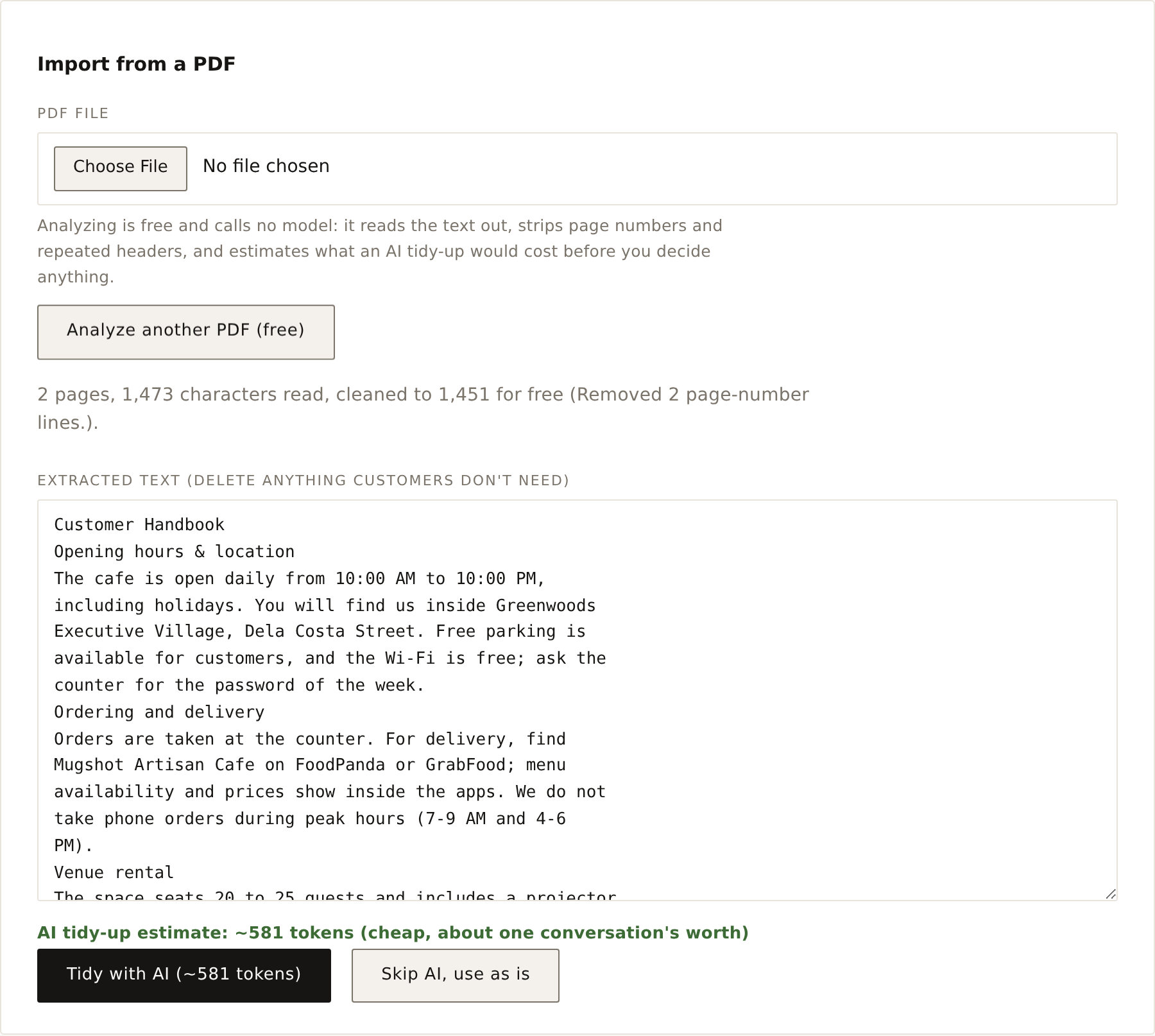
Upload a PDF on the knowledge-base page and the analysis is free: it reads the text out, strips page numbers and repeated headers at no cost, flags scanned files and table-heavy content, and shows what an AI tidy-up would cost before you run it. Delete what customers don't need, run the tidy-up (or skip it), review, save. The actual token usage is reported after, so the estimate earns its keep. Owners: the step-by-step tutorial is Turn a PDF into knowledge; the reference lives in Knowledge base → Import from a PDF.
v0.2.17 - a cleaner console
The admin navigation got a redesign: normal-case labels with hairline icons and a clear active marker. The knowledge-base page now explains how to bring facts in from a PDF or Word file (copy the text, paste, tidy into short sections).
v0.2.16 - transcripts that teach
Every assistant turn in a transcript now carries a label for how the answer was produced, one of four cases: cached, guardrail, used tools, or model only. Hover the label and the tooltip explains the case, why the turn does or doesn't show tokens, and why the debug block is there or not.
v0.2.15 - flagging the baiters
Shaped by a weekend of people probing the live bot.
- Flagged conversations. Prompt-injection bait and
/commandprobes get a fixed refusal (no model runs), the turns are stored, and the conversation is auto-flagged 🚩 in the admin with the reason. You can also flag or unflag any conversation by hand. - Shorter refusals. Off-topic questions get one polite sentence, not an essay, and requests for help with the admin portal, passwords, or account recovery are declined outright, whoever claims to be asking.
- Optional visitor analytics. Point
GA_MEASUREMENT_IDat a GA4 property and the visitor chat pages report per tenant; the admin stays untracked.
v0.2.14 - cache visibility
Transcript turns served from the answer cache are now badged "cached".
v0.2.13 - readable tool debugging
The tool-calls expander in transcripts pretty-prints each call and its result.
v0.2.12 - readable transcripts
Conversation transcripts are now a chat view (visitor right, assistant left), and every admin timestamp shows in your own timezone instead of the server's.
v0.2.11 - honest thermometer
Weather answers now state the air temperature, and only call the heat index "feels like".
v0.2.10 - right events, phone-friendly
"What's coming up?" now answers with events that are actually upcoming, judged in the cafe's own timezone. The admin works properly on phones, and the chat footer fits one line.
v0.2.7 - smoother chat
Messages and chips now animate in, and image builds are much faster.
v0.2.6 - faster, safer, more accurate
Upgraded the framework to Next.js 16, which clears the outstanding security advisories. Faster tool answers (caching + parallel + shorter timeouts), no invented menu items or bean origins, and raw backend errors never shown to visitors.
v0.2.2 - safety hardening
Shaped by real questions people asked the live bot on launch day.
- Protection rules per tenant. A plain-words box on the tenant form for hard boundaries ("never quote rental prices", "no stories"). It can only tighten the bot, never loosen the platform rules. See The admin UI.
- Answers only from real data. The bot no longer names menu items from memory; if the live menu does not list something, it says so. No invented dishes.
- No off-topic writing. Stories, poems and role-play are declined.
- Stays private about itself. It won't discuss its tools, data sources, models or hosting, even to someone claiming to be the owner.
- Speaks the visitor's language. English, Filipino, Taglish, and more, matched automatically.
- Instant refusal of obvious attacks, with no model call, plus a multilingual model backstop for the rest.
v0.2.0 - the platform grew up
- Roles and an audit trail. Owner and staff logins; every change is recorded. See Running it day to day.
- Analytics per tenant. What visitors ask, which tools they reach for, busy hours, and where they come from.
- Move a whole tenant as one file. Export settings and knowledge, import elsewhere.
- Instant repeat answers. Common questions are cached and served at zero cost.
- Graded answer quality. A second model checks the bot's answers for faithfulness.
- Branding: your logo, accent colour, light/dark, and a visitor notice.
v0.1.0 - first release
The multi-tenant assistant: per-business persona, tools and knowledge base, an embeddable widget, and the operator admin.